
Prepare Personalized Campaigns
Create relevant messages using customer details and reusable templates.
Send personalized WhatsApp campaigns, schedule follow-ups and manage customer replies inside Saleoid CRM. Keep conversations connected to customer information so your small team can respond with context. From sharing an offer to answering a question about your services, organize the next step without managing every conversation separately.
Bring everyday customer messaging into your sales and service workflow.
Create relevant messages using customer details and reusable templates.
Prepare campaigns ahead of time and choose when messages should be sent.
Use supported time-based and event-based rules to trigger messages.
Continue conversations inside Saleoid CRM when customers respond.
Support your message with images and documents available through your WhatsApp setup.
Connecting WhatsApp with your CRM helps your team manage messaging alongside the customer relationship. Before sending your first campaign, establish the account, phone number and business setup required for your connection.
Keep your business name, website and customer-support information ready. Confirm who has permission to manage the relevant business account and complete the connection.
If you already use WhatsApp for business, check how your existing number can be connected. Confirm any migration or continued-app-use requirements before changing your setup.
Send a test message, check personalization and confirm where replies appear. Decide who will monitor conversations before launching a campaign.
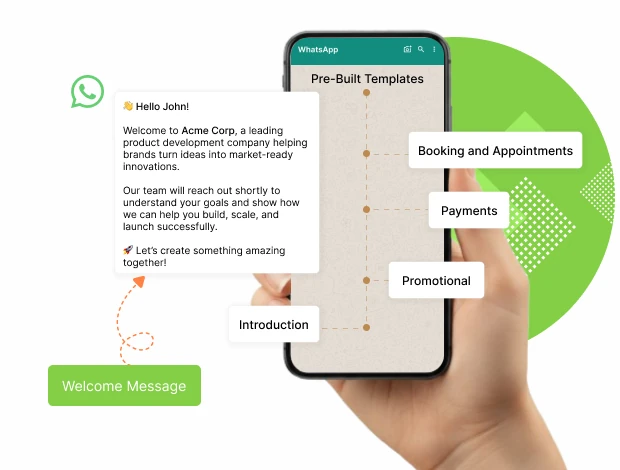
WhatsApp templates provide a reusable structure for messages such as appointment updates, payment reminders and promotions. Saleoid’s published template options give your team a starting point for these communications.
Choose wording that accurately reflects the purpose of your outreach. A service update should explain the relevant transaction or appointment.
Personalize supported fields so customers understand why the message matters to them. Review names, dates, links and other details before sending.
A pre-built template is a starting point; it does not automatically establish approval for your connected account.
Prepare outreach around your business schedule, then use supported automation rules for messages tied to customer activity.
Write your campaign, prepare the relevant recipients and schedule the send. This gives your team time to review the message instead of assembling it between customer calls.
Choose an available event or timing condition, then configure the message it should trigger. Keep each workflow focused on one useful customer update.
Decide what should happen when a customer responds. A message may send automatically while a staff member handles questions, checks availability or discusses requirements.
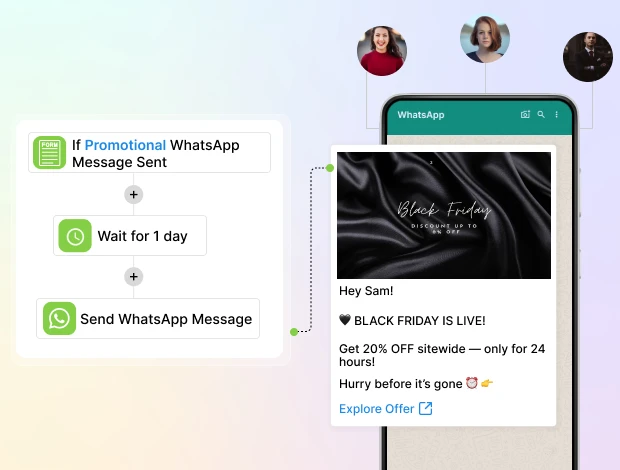
Plan your WhatsApp outreach in Saleoid, send at the right moment and keep every reply connected to the customer record.
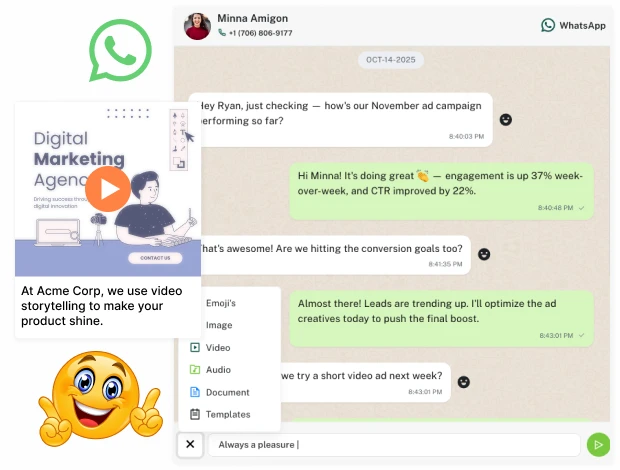
A campaign can start a conversation, but the reply often needs personal attention. Saleoid lets your team manage WhatsApp replies inside the CRM and continue the discussion alongside customer information.
A customer asking “Does this include setup?” needs a clear answer about the service. Review their request before sending another offer or follow-up.
Use the customer information available in your CRM to understand the relationship and prepare a useful response.
A customer message opens or resets a 24-hour customer service window. Within that window, businesses can reply without a message template. Outside it, approved templates are required.
Sometimes a picture or document explains more than another paragraph.
A relevant product image can help clarify an option before the customer decides. Keep the accompanying message specific to their question.
Provide a supported document when customers need more detail, such as a service overview or instructions.
Explain what you are sharing and why. Ask the customer to review a detail, reply with a question or follow the relevant link.
Start your trial with personal guidance for connecting your CRM, planning your first messages and preparing your team to respond.

Coordinate the message and the response around the appointment.
| Step | What happens | Responsibility |
|---|---|---|
| Prepare the message | Choose the relevant template and check appointment details. | Your team |
| Configure the send | Set the available trigger or schedule and sending conditions. | Your team |
| Send the update | The configured campaign or workflow sends the message. | Saleoid |
| Handle the response | Review questions and arrange the next action. | Your team |
A customer reply does not automatically change an appointment. Your team should handle the request through the appropriate scheduling process.
| Step | What happens | Responsibility |
|---|---|---|
| Prepare the audience | Identify relevant customers who have agreed to receive messages. | Your team |
| Prepare the offer | Personalize an approved marketing template with clear terms. | Your team |
| Schedule the campaign | Choose the intended sending time. | Your team |
| Continue the conversation | Answer interested replies and discuss the customer’s needs. | Your team |
“Bright Studio: Returning clients can book a website review for $75 through Friday. Reply for details.”
Start with one campaign, review the customer responses and refine your approach before adding more outreach.
Your total cost combines Saleoid software access with applicable messaging charges. Compare both when planning your budget.
Base CRM starts at $5/month, billed every two years.
Monthly equivalent, billed every two years.
Monthly equivalent, billed every two years.
Two-year prices are monthly equivalents, not monthly payments.
Add WhatsApp Marketing for $1/month extra on Custom. Review the add-on billing term at checkout. Additional users, optional tools and applicable usage charges may affect your total.
WhatsApp marketing software helps businesses prepare campaigns, personalize messages, schedule outreach and manage customer conversations. Saleoid connects these activities with your CRM so your team can handle messaging alongside customer information.
The WhatsApp Business App and a CRM-connected messaging setup serve different working needs. Saleoid brings campaigns, automation and customer replies into its CRM.
Prepare your business details, access to the relevant account and a suitable phone number. Confirm the connection process and any registration or migration requirements with Saleoid before changing an existing WhatsApp setup.
Approved templates are required to initiate conversations through the WhatsApp Business Platform and to send messages outside the customer service window. Pre-built wording still needs to meet the requirements of your connected account and intended use.
Yes, Saleoid allows scheduled messaging and time-based or event-based automation. Choose from the triggers and actions available in your setup, and review the message, recipient eligibility and sending conditions before activation.
Yes, Saleoid allows managing customer replies inside the CRM. Establish who monitors incoming messages and handles follow-ups.
Saleoid’s WhatsApp marketing software allows multimedia sharing, including images and documents.
On Custom, with base plan of $5 per month, you can add on WhatsApp Marketing feature at $1/month extra. It is included in a Premium plan. Applicable messaging and provider charges are separate. Review the complete CRM pricing plans before purchasing.
No, scheduled sends and event-triggered messages are different from a conversational chatbot. Saleoid’s WhatsApp Marketing software comes with AI features that allow you to plan automated replies, branching conversations or a handoff to staff.
Give your team a clearer way to prepare campaigns, follow up and respond to customers on WhatsApp. See the messaging workflow in action and choose a setup that fits your business.
 SALEOID WHATSAPP