
Start With One Purpose
Decide what the reader should do next: explore a service, read an update or contact your team. Build the email around that action.
Create email campaigns, personalize messages and automate follow-ups from the CRM where you manage your customers. Whether you’re introducing a service, welcoming a new customer or sharing an update, Saleoid helps your small team keep email marketing organized alongside everyday sales work.
A connected campaign workflow
A useful email starts with knowing who you’re writing to. Connect your campaigns with the customer information your team already manages in Saleoid.
Create a clear message using the visual email builder.
Select relevant contacts using CRM information and supported filters.
Organize a sequence of emails around a defined customer journey.
Use campaign reporting to decide what deserves another look.
Follow up at the right moment
Create email campaigns, automate drip sequences, personalize messages, and track opens, clicks, replies, and unsubscribes inside Saleoid CRM.

Create with confidence
Use Saleoid’s drag-and-drop email builder to arrange text, images, buttons and other available content blocks. Give your message a clear structure without having to write HTML.
Decide what the reader should do next: explore a service, read an update or contact your team. Build the email around that action.
Use a helpful heading, short paragraphs and a clear button. Include the information someone needs before asking them to click.
Check the layout on different screen sizes. Review links, images and contact details so a small mistake doesn’t reach your whole audience.
Relevance over volume
Email segmentation means dividing your contacts into smaller groups so you can send more relevant messages. Use Saleoid’s supported CRM filters to prepare an audience around details such as tags, deal stage or recorded activity.
Check marketing permission as well as message relevance.

Make each message feel considered
Use supported CRM fields to add details such as a recipient’s name or company to your email. Personalization works best when it helps explain why you’re getting in touch.
Check contact details before sending, and keep every message useful even when personalization fields are unavailable.
Follow up at the right moment
An automated email sequence sends a series of messages according to configured rules and delays. Use Saleoid’s email automation to organize introductions, educational messages and follow-ups without preparing every email individually.
Start with a supported trigger that matches the purpose of your sequence. Be clear about who should receive it.
Introduce your business in one message, answer a common question in another and offer a relevant next step when appropriate.
Check the audience, timing and available exit conditions. Make sure your team knows how to handle a reply or a customer whose circumstances have changed.

LAUNCH BONUS INCLUDED
Have an announcement to share or a follow-up that keeps getting postponed? See how your team can build the email, choose its audience, and prepare the next step in Saleoid.

Prepare before the first send
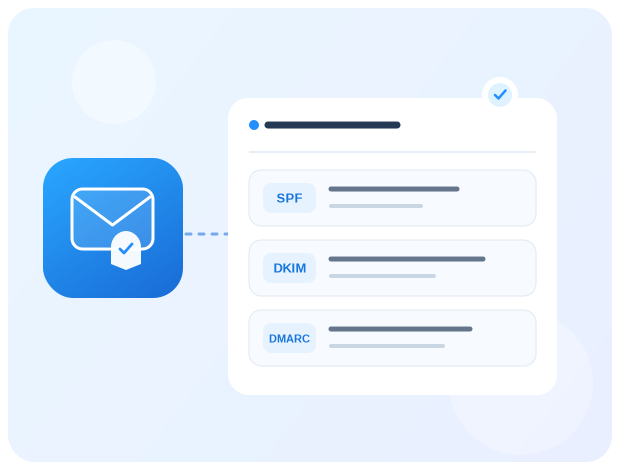
Authentication helps receiving services verify that a sending service is authorized to send email for your domain.
Identifies which sending services are authorized for a domain.
Adds a signature that receiving services can validate against the signing domain.
Defines how authentication aligns with the visible From domain and how failures should be handled.
Follow the setup instructions for your actual sending provider. DNS records depend on the services your business uses.
Email in everyday customer work
Use a simple sequence to stay helpful while your team manages the personal conversation.
Someone asks about your service while you’re busy with another customer. Prepare a sequence that gives them useful information without replacing personal follow-up.
Give past customers a relevant reason to hear from you again.
Start with one useful campaign. Review what customers respond to before adding more messages.
Learn from each send
Saleoid provides email engagement reporting so your team can review campaign activity and contact history. Use the available metrics to ask practical questions.
Treat as an estimate and compare with other engagement signals.
See whether readers explored the information you shared.
Find questions that need a personal response.
Review your audience, message, and sending frequency.
Plans and sending allowances
Compare the app add-on or bundled plans based on your audience, sending volume, and team requirements.
Email Marketing is an optional app for your CRM setup.
Add Email Marketing for $1/month to the base subscription.Email Marketing included with 10,000 emails per month.
$29.40/month, billed every 2 years.Email Marketing included with 50,000 emails per month.
$119.40/month, billed every 2 years.Prices are monthly equivalents for two-year billing. The Custom base plan starts at $5/month, billed every 2 years.
Saleoid connects email campaigns with your CRM, bringing audience selection, personalization and contact activity together. It can suit teams that want to manage marketing alongside customer relationships.
No. Saleoid’s drag-and-drop email builder lets you arrange text, images, buttons and available content blocks without coding. Preview your email before sending to check the layout and links.
Yes. Use supported CRM fields, such as a contact’s name, company or custom details, to personalize email content. Review missing or outdated information before sending.
Yes. Create email sequences using supported triggers and delays for introductions, lead nurturing and customer follow-ups. Workflow automation can connect email steps with other business activities.
Segmentation groups contacts using criteria such as tags, deal stage or recorded activity. Use Saleoid’s supported filters to select a relevant audience, then check recipients and marketing permissions before sending.
Saleoid describes reporting for opens, clicks, replies, bounces and unsubscribes. Use these signals to review campaigns and improve future messages. Open tracking is an estimate, so consider it alongside other activity.
Saleoid lists A/B testing within automation workflows on Growth and Premium. Confirm the available testing controls for your intended comparison; workflow testing may differ from a dedicated campaign subject-line test.
Yes. Saleoid’s builder supports responsive email layouts and previews for different screen sizes. Check text, images and buttons before sending, as appearance can vary between email applications.
Saleoid describes unsubscribe management and delivery reporting. Deliverability also depends on domain authentication, list quality, recipient expectations and sending practices. No email marketing platform can guarantee inbox placement.
Saleoid describes behavior-based triggers, including email link clicks and form submissions. Available triggers depend on your setup; website activity also requires the relevant tracking configuration.
Contact limits depend on your plan: Custom lists 2,500 contacts, Growth 5,000 and Premium 25,000. Saleoid supports CSV and Excel imports. Check CRM pricing before importing your database.
Saleoid describes contact-level email history, including recorded sending and engagement activity. This gives your team context before following up through the sales CRM.
Yes. Saleoid provides a drag-and-drop builder with content blocks for arranging an email visually.

Curious to know how Saleoid can transform your business and its operations? Request a free demo today and witness the revolution firsthand!